GA4 BigQuery Export Timezone: Why Daily Counts Come Up Short
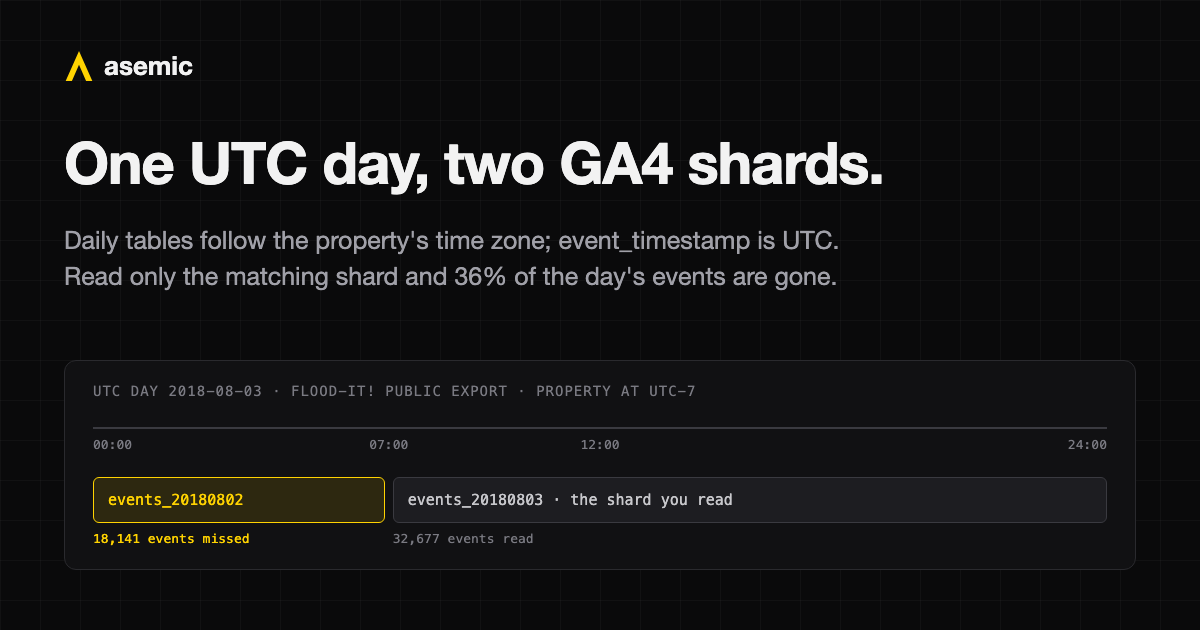
In short: GA4’s BigQuery daily tables (events_YYYYMMDD) are cut on the property’s reporting time zone, while event_timestamp is UTC. A UTC day therefore spans two daily tables, and a query that reads only the matching table misses part of it: 36% of a day’s events on Google’s public Flood-It! export. Read one extra table on each side and filter on the timestamp, or date everything in the property’s time zone.
Here is a query that looks correct, and that we have seen in production more than once. It counts one day’s events and users from the GA4 BigQuery export in UTC, reading only that day’s daily table so it stays cheap, and it never considers the export’s time zone:
SELECT COUNT(*) AS events, COUNT(DISTINCT user_pseudo_id) AS users
FROM `firebase-public-project.analytics_153293282.events_*`
WHERE _TABLE_SUFFIX = '20180803'
  AND DATE(TIMESTAMP_MICROS(event_timestamp)) = '2018-08-03'
Run against Google’s public Flood-It! sample export (the dataset in the query is public, so you can run it yourself), this returns 32,677 events from 383 users. The full count for that UTC day in this dataset is 50,818 events from 522 users. The query silently drops 36% of the day’s events and 27% of its active users, and nothing about the result looks wrong.
How the GA4 BigQuery export timezone splits your days
Two facts about the export, each documented, sit badly together.
The daily tables (events_YYYYMMDD) are cut on the property’s reporting time zone. So is the event_date column inside them. A property set to US Pacific gets shards that run from midnight to midnight Pacific.
The event_timestamp column is UTC, in microseconds. The moment you write DATE(TIMESTAMP_MICROS(event_timestamp)), you are using UTC days, and a UTC day does not line up with any one shard.
Flood-It!‘s property runs seven hours behind UTC in this data (US Pacific in summer, for example). Each of its shards runs from about 07:00 UTC to 07:00 UTC the next day (a few rows land seconds past the boundary, since event_timestamp is logged by the device). Here is the first week of August 2018, counting the rows in each shard by their UTC date:
| Shard | Rows | Same UTC date | Next UTC date |
|---|---|---|---|
| 20180801 | 50,000 | 32,864 | 17,136 |
| 20180802 | 50,000 | 31,859 | 18,141 |
| 20180803 | 50,000 | 32,677 | 17,323 |
| 20180804 | 50,000 | 35,071 | 14,929 |
| 20180805 | 50,000 | 34,492 | 15,508 |
| 20180806 | 50,000 | 33,947 | 16,053 |
| 20180807 | 50,000 | 30,956 | 19,044 |
(The public sample caps each shard at 50,000 rows, so treat these as proportions, not traffic. All 114 shards fall in US daylight time, which is why the offset never changes in this data.) Across all 114 shards in the dataset, 33.9% of events happen between 00:00 and 07:00 UTC. For this game, the first seven hours of every UTC day live in the previous day’s table.
West of UTC, the missing rows are at the start of each UTC day and sit in the shard before. East of UTC the error flips: a property in Central Europe loses the last hour or two of each UTC day to the shard after, and one in East Asia loses the last eight or nine hours. Daylight saving time moves the boundary by an hour twice a year, so the size of the error changes with the season.
Where the UTC mismatch undercounts your data
How much this costs you depends on how many days a query reads at once.
- A multi-day chart loses part of one edge day only. West of UTC, the first day of the range reads low. It looks like a small dip at the left edge of every chart, which most people put down to noise.
- A one-day incremental job, the kind that builds yesterday’s numbers every morning, loses the cross-midnight share every day. On Flood-It! that is a third of all events and a quarter of daily users, on every day, consistently. Because the error is roughly constant (30 to 38% here), the series looks healthy. Nothing spikes. The level is wrong.
- A chunked backfill loses it on the first day of every chunk, so revenue and event counts dip at chunk boundaries, in a pattern that depends on how the backfill was split rather than on anything players did.
The one-day case is the dangerous one. A visible error gets fixed. A steady one-third undercount ends up in the board deck.
Two correct ways to query the GA4 BigQuery export
You have to pick one definition of a day and make the shard filter agree with it.
Option 1: use event_date (the property’s reporting time zone)
Filter and group on event_date (or convert timestamps to the property’s time zone), and a day is one shard. This is the day boundary the GA4 interface uses, so your days line up with it (totals still differ for the usual reasons: approximate user counts, thresholding, consent modelling). The cost comes later. Many ad-network and MMP exports default to UTC, so joining them to property-local days misaligns hours at both ends of every day. In a DST zone, one day a year is 23 hours long and one is 25. Two games whose properties sit in different time zones do not line up day by day, so their daily totals do not add cleanly.
Option 2: use UTC with a one-shard _TABLE_SUFFIX margin
Keep UTC days, widen the shard filter by a day on each side, and let the timestamp decide which rows count:
SELECT
  DATE(TIMESTAMP_MICROS(event_timestamp)) AS utc_day,
  COUNT(*) AS events,
  COUNT(DISTINCT user_pseudo_id) AS users
FROM `firebase-public-project.analytics_153293282.events_*`
WHERE _TABLE_SUFFIX BETWEEN '20180802' AND '20180804'  # the day, plus one shard each side
  AND DATE(TIMESTAMP_MICROS(event_timestamp)) = '2018-08-03'
GROUP BY utc_day
This returns the full 50,818 events and 522 users. The suffix filter stays a literal range, so BigQuery still prunes shards. (A subquery in the _TABLE_SUFFIX filter, or a view over events_* filtered on a date column instead of the suffix, loses pruning and scans the whole export; that is the cost trap from our earlier post.) The range also excludes the events_intraday_* tables, whose suffixes start with intraday_ and sort after every date.
The price is two extra shards per read. For a one-day read that up to triples the bytes scanned. For a 30-day read it is about 7% more. If you know which side of UTC you are on, one extra shard is enough, but a margin on both sides also covers a property whose time zone was changed and the hour that DST moves, without anyone having to remember either.
The margin only helps once the neighbouring shard is final. East of UTC, the end of yesterday’s UTC day lives in today’s shard, which Google finalizes only after the property’s day ends. A job that runs in the morning should either wait for that shard or read the matching events_intraday_* table for the missing hours.
We shipped this bug too
Asemic dates events in UTC, so every source in a model shares one calendar. Our active-user builds always read the margin. From the launch of our GA4 support in July until 30 October 2026, our event reads did not: they pruned shards to exactly the requested range. For properties west of UTC, the first day of every event read came up short; east of UTC, the last day did. Values we build one day at a time, such as daily revenue in lifetime totals, were short on every day, by the cross-midnight share. For a property on US Pacific time that is roughly a third. Daily active users were not affected.
We found it by building the same game twice, once from the export and once from our analysis-ready copy of it, which is partitioned by exact UTC date, and diffing the results. Every event read now takes the same one-shard margin. Models built before the fix need one rebuild, after which the numbers move up to the correct values; the GA4 docs cover which models are affected. The lesson is not specific to us: when one data source is partitioned by one clock and queried by another, test the day boundary explicitly, against a second source that partitions differently.
A check you can run today
If you query the export yourself, run your daily totals both ways for a few days: once with the shard range you use today, once with a shard of margin on each side, filtering on the same UTC date. If the numbers differ, the difference is what you have been missing. If your property has always been on UTC, they should match.
If you would rather not hand-write the margin, the shard pruning, and the parameter unnesting in every query, that is what Asemic’s GA4 support does, on your own export, with read-only access. The time zone is not the only silent skew; these GA4 BigQuery export data quality issues change installs and DAU too. And once the numbers are right, the next question is why they moved, which is what causal decomposition is for. Or book a demo and bring your analytics_ dataset.